Build a Monster PNG: A Practical Guide to Modular Clipart for Creative Projects
In the evolving landscape of digital design, static images often fall short when creators seek personalization and unique storytelling. This is where the concept of modular graphics comes into play. Specifically, the Build a Monster PNG bundle represents a shift from passive consumption of artwork to active creation. Rather than downloading a single, fixed illustration, users gain access to a library of interchangeable parts that allow for infinite combinations. For designers, educators, parents, and crafters, understanding the utility and limitations of this format is essential before integrating it into their workflow.
This article explores what makes these modular clipart bundles distinct, how they compare to traditional static assets, and who stands to benefit most from this approach. By evaluating the technical specifications and practical applications, you can determine if this resource aligns with your current project needs.
Understanding the Modular Design Approach
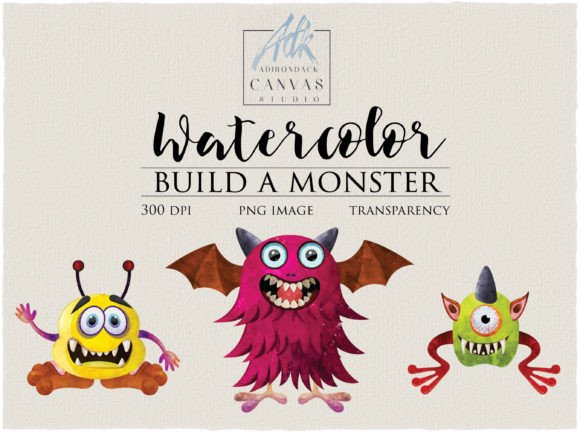
The core value proposition of a Build a Monster kit lies in its modularity. Instead of receiving one finished character, the user receives dozens of individual elements—eyes, mouths, bodies, horns, and accessories. In the specific context of the watercolor monster bundle mentioned, this includes 57 different PNG elements. Each element is isolated on a transparent background, typically at a high resolution of 300 DPI and dimensions around 2000 x 2000 pixels.
This structure transforms the user from a consumer into a co-creator. The artistic style, often soft watercolor in these popular bundles, provides a cohesive aesthetic while allowing for significant variation. You are not limited to the pre-composed examples shown in product previews. Instead, you can mix and match parts to create characters that fit specific narratives, color schemes, or emotional tones. This level of customization is particularly valuable in educational settings or personalized gift creation, where uniqueness is paramount.
Comparing Modular PNGs to Static Clipart
When evaluating digital assets, it is helpful to compare modular bundles against traditional static clipart. Both have their place, but they serve different functions.
- Versatility: Static clipart offers a quick solution. If you need a generic monster for a Halloween flyer, a single PNG is efficient. However, if you need five different monsters for a children’s book, buying five separate images can become costly and stylistically inconsistent. A Build a Monster PNG bundle allows you to generate those five unique characters while maintaining a uniform artistic style.
- File Management: Static images are simpler to handle. You download one file and use it. Modular kits require more initial setup. Users must unzip files, organize folders, and understand layering in their design software. For beginners, this learning curve can be a barrier.
- Cost Efficiency: While modular bundles may have a higher upfront cost than a single clipart image, the cost-per-use decreases significantly over time. For professionals who frequently need custom illustrations, the ability to generate endless variations from one purchase offers better long-term value.
The decision often comes down to frequency of use and the need for customization. If you only need one specific image once, static is better. If you need a system for generating varied content, modular is superior.
Technical Considerations and Quality Standards
Not all clipart bundles are created equal. When assessing a Build Your Own Monster Clipart package, technical specifications are critical. The standard for professional print and high-quality digital display is 300 DPI (dots per inch). Lower resolutions, such as 72 DPI, may look acceptable on social media but will appear pixelated when printed on nursery decor, t-shirts, or party invitations.
The inclusion of transparent backgrounds is non-negotiable for this type of asset. Without transparency, placing a monster part onto a colored background or another image requires tedious manual editing. High-quality PNGs ensure that the edges are clean and ready for immediate layering. Additionally, the file size matters. Elements sized at 2000 x 2000 pixels provide enough flexibility to scale up or down without losing clarity, accommodating everything from small tags to large posters.
It is also important to note the delivery format. These bundles typically come as ZIP files. Users must ensure they have the software capability to extract these files on their device, whether it is a desktop computer or a mobile tablet with appropriate apps. Failure to prepare for this step can lead to frustration immediately after purchase.
Ideal Use Cases for Monster Clipart Bundles
The versatility of these graphics makes them suitable for a wide array of projects. Here are some practical scenarios where this resource excels:
- Educational Materials: Teachers can create custom characters to represent different emotions, helping children identify feelings. Since the parts are interchangeable, you can create a "happy" monster, a "sad" monster, and an "angry" monster using the same base style.
- Personalized Merchandise: For those running small businesses on platforms like Etsy, offering personalized items is a key differentiator. You can create a monster that matches a child’s name or favorite colors for birthday shirts or nursery art.
- Party Decor and Invitations: Themed parties benefit from cohesive yet varied designs. Using a build-a-monster kit allows you to create a cast of characters for banners, cupcake toppers, and invitations that feel like a family rather than random, unrelated images.
- Scrapbooking and Card Making: Handmade crafters appreciate the tactile quality of watercolor styles. These digital assets can be printed on high-quality cardstock or sticker paper to add unique embellishments to physical projects.
Limitations and When to Look Elsewhere
While powerful, this format is not a universal solution. There are specific situations where a Build a Monster PNG might not be the right choice.
First, if you lack basic graphic design skills or software, the utility of these files diminishes. You need a program that supports layers, such as Adobe Photoshop, Procreate, Canva, or even PowerPoint, to assemble the parts effectively. If you are looking for a drag-and-drop solution with no assembly required, pre-made illustrations are more appropriate.
Second, if you require highly realistic or 3D-rendered aesthetics, watercolor clipart will not meet your needs. The artistic style is inherently soft, textured, and whimsical. It is ideal for children’s products and friendly designs but unsuitable for corporate branding or horror-themed projects that require sharp, dark, or photorealistic visuals.
Finally, consider the time investment. Creating a unique character takes longer than selecting a pre-made one. If you are working under a tight deadline with no room for experimentation, static assets offer speed and predictability.
Making the Right Choice for Your Project
Choosing between modular and static assets ultimately depends on your goals. Ask yourself three questions:
- Do I need multiple variations of a similar theme?
- Do I have the tools and time to assemble the images?
- Is consistency in artistic style important for my project?
If the answer to these is yes, then investing in a comprehensive clipart bundle is a strategic move. It empowers you to maintain brand or thematic consistency while avoiding the repetitive look of stock photography. The Build a Monster concept encourages creativity and extends the lifespan of your digital library, as you can return to the same set of parts months or years later to create something entirely new.
For those interested in exploring this creative avenue, ensure you verify the license terms. Most creators allow for both personal and commercial use, but restrictions may apply regarding mass production or resale of the raw files. Always read the included documentation to ensure compliance.
In conclusion, the Build a Monster PNG bundle is more than just a collection of images; it is a toolkit for creative expression. By understanding its strengths in customization and consistency, and acknowledging its requirements for technical skill and time, you can make an informed decision. Whether you are designing nursery decor, creating educational resources, or crafting personalized gifts, this modular approach offers a flexible and engaging way to bring your ideas to life.